

500 Internal Server Error? 10 Common Causes & How to Fix It
If your website is suddenly showing a 500 Internal Server Error, it can look as though the whole site has failed.
You might see a completely blank page, a message saying Internal Server Error, or something similar to “This page isn’t working – HTTP ERROR 500.”
The frustrating part is that the message doesn’t tell you what has actually gone wrong.
A 500 error is a general server error. In simple terms, the server tried to process a request, something went wrong, and it couldn’t return the page normally.
That can be caused by anything from a faulty plugin or PHP error to a damaged configuration file, exhausted memory or a problem with the hosting environment.
The important thing is that a 500 error does not normally mean your website needs rebuilding. It means the underlying fault needs finding.
Send us your website address and tell us when the problem started. We’ll investigate what’s failing and work out what needs fixing.
What Does a 500 Internal Server Error Mean?
The number 500 is an HTTP status code.
Normally, when somebody visits a page, their browser requests it from the web server and the server returns the content.
With a 500 error, the server has encountered an unexpected problem and cannot complete that request normally.
Mozilla’s HTTP 500 status documentation describes it as a generic server error used when the server cannot provide a more specific 5xx response.
That’s why two websites displaying exactly the same 500 Internal Server Error can have completely different underlying problems.
You therefore need to diagnose the cause rather than treat “500” as the cause itself.
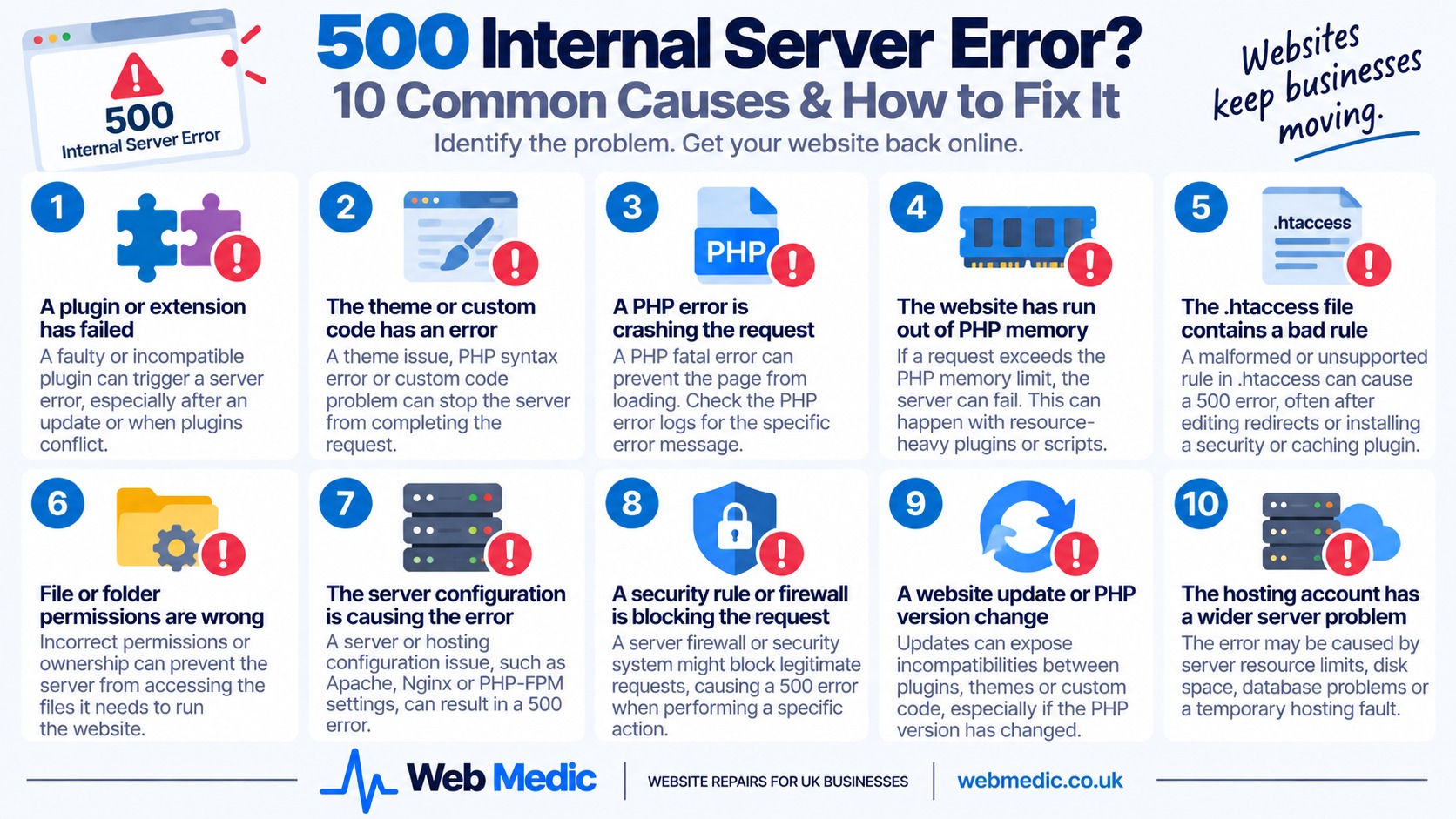
1. A Plugin or Extension Has Failed
On WordPress and other content management systems, an extension can cause a server error when its code fails during a request.
This might happen because:
- a plugin has just been updated
- two plugins conflict with each other
- the plugin isn’t compatible with the current PHP version
- a required file is missing or damaged
- the plugin encounters data it cannot process
If the 500 error appeared immediately after installing or updating something, that timing provides an obvious place to start investigating.
On WordPress, a faulty plugin can sometimes prevent access to wp-admin as well as the public website.
In that situation, plugins can be disabled through the site’s files rather than through the WordPress dashboard, but this should be done carefully – particularly on ecommerce or other business-critical websites.
Don’t start randomly deleting plugins. Establish what changed, preserve a backup and test methodically.
2. The Theme or Custom Website Code Has an Error
The same principle applies to themes and custom code.
A PHP syntax error, undefined function, incompatible piece of code or failed theme update can stop the server completing the request.
A useful clue is where the 500 error occurs.
For example:
- every page fails
- only one page fails
- the website works but wp-admin fails
- the homepage works but product pages fail
- the error appears only when a particular feature is used
If only one area of the website triggers the error, the problem may be associated with the code used by that particular page or function.
This is one reason reproducing the fault is so valuable.
3. A PHP Error Is Crashing the Request
Many websites – including WordPress, WooCommerce, Magento, OpenCart and Joomla sites – rely heavily on PHP.
If PHP encounters a fatal error while building a page, the visitor may receive a 500 error instead of the website.
The browser usually doesn’t show the useful technical detail because displaying raw server errors publicly can reveal information that shouldn’t be exposed.
The useful information may instead be recorded in an error log.
Current cPanel guidance for HTTP 500 errors on PHP websites specifically recommends examining the relevant PHP error logs to identify what is failing.
A good diagnostic approach is to reproduce the error, note the exact time, and then inspect the log entries generated at that moment.
That can turn an unhelpful “Internal Server Error” into a specific filename, function or PHP error that can actually be repaired.
4. The Website Has Run Out of PHP Memory
A website has a limit on how much memory a PHP process is allowed to use.
If a request exceeds that limit, processing can fail.
This can happen because of:
- a resource-heavy plugin
- a badly behaved script
- a large import or export
- image processing
- complex ecommerce operations
- a loop or coding problem consuming excessive memory
cPanel lists an exhausted PHP memory limit among the common causes of PHP websites returning a blank page or HTTP 500 error.
Increasing the memory limit may sometimes get the site running again, but it isn’t always the complete solution.
If a website that previously used modest resources suddenly consumes huge amounts of memory, it’s worth finding out why.
Simply raising limits indefinitely can hide the real fault.
5. The .htaccess File Contains a Bad Rule
On Apache-based hosting, a file called .htaccess can control important aspects of how website requests are handled.
WordPress commonly uses it for permalink rewriting, while plugins may add rules for security, caching, redirects and other functionality.
A malformed or unsupported rule can result in a 500 error.
This can happen after:
- editing redirects
- installing a security plugin
- changing caching software
- moving the website
- manually modifying .htaccess
WordPress support guidance also identifies .htaccess as one of the areas worth checking when diagnosing an Internal Server Error.
However, don’t casually delete the file on a live website.
It may contain redirects, security rules or other configuration that needs preserving. Take a copy and understand what the existing rules are doing before replacing anything.
6. File or Folder Permissions Are Wrong
Web servers need permission to read and execute the files required to run a website.
If permissions or ownership are incorrect, a request can fail.
This sometimes occurs after:
- a website migration
- manual file uploads
- restoring a backup
- server changes
- permissions being altered for security reasons
MDN includes improper file permissions among the possible causes of HTTP 500 errors.
The correct permissions depend on the server and hosting environment, so blindly changing everything to highly permissive settings is not a sensible fix.
Permissions should be corrected to appropriate values, not simply opened up until the website works.
7. The Server Configuration Is Causing the Error
Sometimes the website files aren’t the real problem at all.
A 500 error can originate from the hosting environment or web-server configuration.
Possible areas include:
- Apache or Nginx configuration
- PHP-FPM
- PHP modules
- security rules
- server resource limits
- hosting account configuration
This is particularly worth considering if the error appeared after the host changed PHP versions, migrated the account, altered server configuration or carried out maintenance.
It also explains why restoring yesterday’s copy of the website doesn’t necessarily fix every 500 error.
If the fault is outside the website itself, restoring the same files onto the same broken environment may simply reproduce the problem.
8. A Security Rule or Firewall Is Blocking the Request
Hosting security systems are designed to stop malicious requests, but occasionally they can block legitimate website activity too.
A web application firewall or server security rule might object to:
- a particular URL
- form data
- an admin action
- an API request
- a plugin operation
- an upload
This can create a particularly confusing fault where most of the website works normally but one action repeatedly produces a server error.
If the 500 error happens only when performing a specific task, check whether a server-side security system is involved rather than assuming the whole website is broken.
9. A Website Update or PHP Version Change Has Exposed an Incompatibility
Updates don’t necessarily “break websites”, but they can expose software that is no longer compatible with the rest of the system.
For example, a hosting company might move the website to a newer PHP version while an old plugin still relies on code that is no longer supported.
Likewise, updating one major component while leaving related extensions several versions behind can expose compatibility problems.
If a 500 error started after an update, useful questions include:
- What was updated?
- What version was running before?
- Was PHP changed?
- Were all related extensions compatible?
- Did the update complete successfully?
Again, the answer isn’t necessarily to roll everything back permanently.
The goal is to identify the incompatible component and put the website back into a stable, supported state.
10. The Hosting Account Has a Wider Resource or Server Problem
Not every Internal Server Error is caused by website code.
The server itself may be experiencing a problem or the hosting account may be hitting resource limits.
Depending on the hosting environment, this might involve:
- memory
- CPU
- process limits
- disk space
- database problems
- temporary server faults
If several unrelated websites on the same hosting account fail at once, or the error comes and goes without any website changes, the hosting environment becomes a stronger suspect.
Check the hosting control panel, resource usage and service status where available.
But don’t assume that “it’s the server” simply because the browser says Internal Server Error. The server may only be reporting a failure caused by the website’s own code.
Why Did My Website Suddenly Start Showing a 500 Error?
If the website was working yesterday and nobody deliberately changed anything, it can feel as though the error appeared from nowhere.
But websites aren’t completely static.
Behind the scenes there may have been:
- an automatic WordPress or plugin update
- a PHP version change
- a hosting configuration change
- a scheduled task
- a security rule update
- a sudden increase in resource usage
- a failed background process
The timeline is therefore one of the most useful diagnostic tools.
Find the last known time the website worked and compare it with updates, logs and hosting activity around the time it failed.
Why Does Only One Page Show a 500 Internal Server Error?
A 500 error doesn’t have to affect the entire website.
If only one page fails, concentrate on what makes that page different.
It might use:
- a particular plugin or shortcode
- a database query
- custom PHP code
- a page-builder element
- an external service
- a large amount of memory
The same applies if only checkout, wp-admin, a contact form or another particular function fails.
The narrower the failure, the more useful that information becomes when tracing its cause.
Can I Fix a 500 Internal Server Error Myself?
Sometimes.
If you know exactly what changed immediately before the error – for example, a plugin was activated and the site instantly failed – the cause may be relatively straightforward.
But a 500 error often requires access to:
- website files
- hosting control panel
- PHP or server logs
- database tools
- server configuration
Those aren’t good places for trial-and-error changes if you aren’t comfortable working with them.
In particular, avoid copying random .htaccess, PHP or server configuration snippets from old forum posts into a live business website.
The safest approach is to use the evidence available – especially logs and the timing of the failure – to diagnose the actual problem.
What Should I Check First?
Before making changes, establish the scope of the fault.
Check:
- Does the whole website show the error?
- Is it only one page?
- Can you access the website admin area?
- Did the problem start after an update?
- Was PHP recently changed?
- Was the site migrated or restored?
- Are other sites on the same hosting affected?
- Can you reproduce the error consistently?
If you have access to the relevant server or PHP error log, reproduce the fault and check what is logged at that exact time.
That’s often far more productive than working through a generic checklist and changing things that were never broken.
Does a 500 Error Mean My Website Is Lost?
No.
A 500 Internal Server Error means the server couldn’t successfully complete a request. It doesn’t mean the website’s content, database or design has disappeared.
Even a completely inaccessible website may only have one relatively small technical fault preventing it from loading.
That could be a plugin, a PHP error, a configuration rule or a hosting problem.
This is exactly why Web Medic takes a repair-first approach.
Before anybody starts talking about replacing the website, find out what’s actually broken.
Our Website Repair Services are designed for faults like this, and if the affected site is WordPress we can also provide WordPress Support.
We don’t need to have built the original website and you don’t need to move your hosting to us before we’ll investigate it.
500 Internal Server Error – Frequently Asked Questions
What does 500 Internal Server Error mean?
A 500 Internal Server Error means the web server encountered an unexpected problem and couldn’t complete the request normally. It is a generic server error, so the message itself does not identify the underlying cause.
What causes a 500 Internal Server Error?
Common causes include PHP errors, plugin or theme conflicts, incorrect server configuration, .htaccess problems, exhausted memory, file permissions, security rules and hosting or resource problems.
Can a WordPress plugin cause a 500 error?
Yes. A plugin can trigger a 500 error if its code fails, conflicts with another component or is incompatible with the site’s WordPress or PHP version. The error log can often help identify the plugin or file involved.
Can .htaccess cause a 500 Internal Server Error?
Yes. On servers that use .htaccess, a malformed or unsupported rule can cause an Internal Server Error. The file may also contain important redirect, security or caching rules, so it should be backed up before changes are made.
Can low PHP memory cause a 500 error?
Yes. If a PHP request exhausts the memory available to it, processing can fail and the website may return a 500 error. However, it is also worth establishing why the website required excessive memory rather than simply increasing the limit indefinitely.
Why does only one page on my website show a 500 error?
If only one page or function fails, the cause may be code or functionality specific to that area, such as a plugin, database query, custom script, page-builder component or external integration.
Can Web Medic fix a 500 Internal Server Error?
Yes. We can investigate 500 errors on existing websites, including WordPress and other PHP-based sites. We can examine the website, logs and hosting environment to identify the underlying fault and determine the appropriate repair.
Still Seeing a 500 Internal Server Error?
If your website is down with an Internal Server Error, don’t assume it needs rebuilding.
Send Web Medic your website address and tell us when the error started and whether anything changed immediately beforehand.
We’ll investigate the underlying problem and work out the sensible way to get the website running again.


